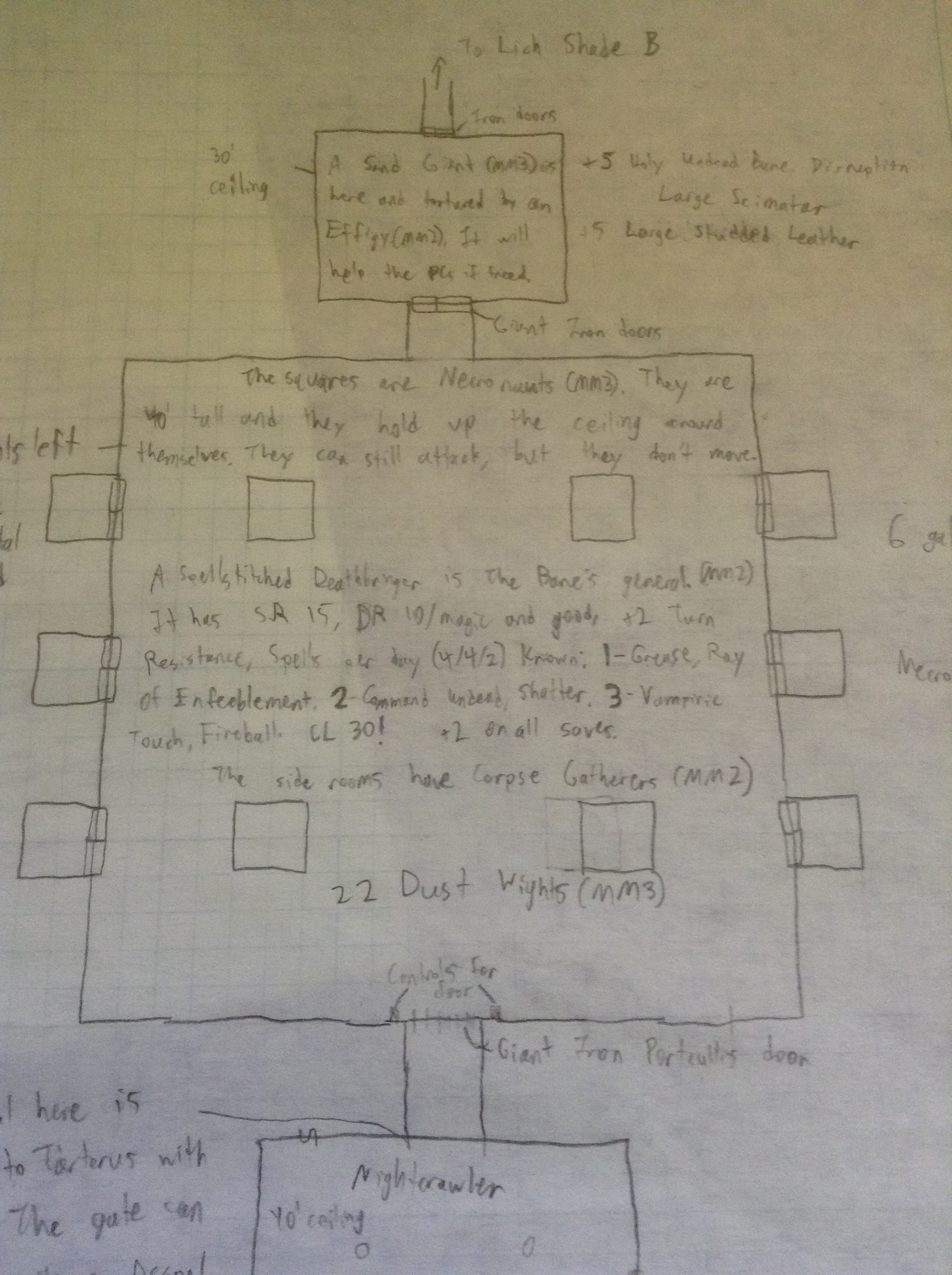
Room 2 of the Lich Shade dungeon drawn using graph paper with notes on it.

There a lot of different styles of DMing in D&D and other roleplaying games.

You can wing it and come to each session with very little prepared.

You can come up with the adventure for each session in the week before.

You can also do what I do, make up the entire campaign before starting it.

Between each session I have almost no creative work to do for D&D. My campaign has been running for close to three years now and I’ve only had to design one adventure out of about a dozen since then.

It’s nice. I don’t need to spend extra time on the game for me and my friends to have a lot of fun.

I have started to run into a few issues though.

When I wrote the campaign I imagined my group would still manage to meet in person.

That proved to be horribly wrong. We have in person sessions about once a year now.

When I drew all my maps they looked like the one pictured above. I’d make them on a piece of yellow-green graph paper.

When they reached a room I’d draw with a wet-erase marker on a battle mat I brought to each session.

When the players defeated the monsters in one room I’d erase and draw the next room.

Dry erasing was easy, but creating good maps in our current system is a little difficult.

My group now plays over the internet using an internet browser program called Roll20.

Roll20 is really great. It has everything a tabletop has. You can even turn on a feature to see your dice roll across the table.

However, I can’t just grab a pen and draw on my monitor as easily as I draw on the battle mat used previously.

I suppose I could do that if I was used to creating digital images, but I’m not.

Instead I’ve taken to making lame looking maps or using a cool mapping software piece called GridMapper.

The second room of the Lich Shade dungeon made using GridMapper.

GridMapper is extremely simple. You pretty much just click to change stuff.

I can easily build maps in GridMapper. They don’t look amazing because it doesn’t come with preset images like trees and stuff, but they’re functional just like my dry erase mat.

GridMapper has one issue, it has a maximum image size. Easy to get around though, I just make two images and glue them together for really big rooms.

I’m slowly converting all my old pencil maps into GridMapper maps for Roll20 now.

That’s it for now!

-Mister Ed

One response to “Mapping Methods”

  1. Roll20 and D&D | GoCorral Avatar

    […] mentioned Roll20 in past posts about how my group plays D&D, but I figure it deserves a post all its […]

Leave a comment

I’m Isaac

Welcome to the GoCorral website! I’m Isaac Shaker and this is a place for me to write about D&D and occasionally other topics. I host a podcast called Setting the Stage that interviews different DMs about their campaigns. I’m currently focused on completing the Cimmeria campaign setting and turning it into a book.

Setting the Stage Podcast

73 – Duncan and Extraordinary Locations Setting the Stage, Campaigns for D&D and Other RPGs

Duncan Rhodes comes on the show to talk about his new book, The Creative Game Master's Guide to Extraordinary Locations: & How to Design Them or just Extraordinary Locations. The book is filled with 30 adventure locations to drop into your campaign, modify, or use as a full adventure path! The locations are loosely stated out for D&D 5e but could easily be adapted for any fantasy system. Additionally, the book has a step-wise guide for crafting your own adventures based around locations just like those in the book.To follow Duncan's blog postings you can check out Hipsters & Dragons: https://www.hipstersanddragons.com/And his book, The Creative Game Master's Guide to Extraordinary Locations: & How to Design Them, is available on Amazon and most likely at your local book or game stores: https://www.amazon.com/Creative-Masters-Guide-Extraordinary-Locations/dp/1965636306Our website: https://gocorral.com/stsWant to be on the show? Fill out this survey: https://forms.gle/U11TbxtAReHFKbiVAJoin our Discord: https://discord.gg/Nngc2pQV6CSupport the show on Patreon: https://www.patreon.com/SettingtheStage Hosted on Acast. See acast.com/privacy for more information.
  1. 73 – Duncan and Extraordinary Locations
  2. 72.5 – Calico and Psychomortis (Part 2)
  3. 72 – Calico and Psychomortis (Part 1)
  4. 71 – Aaron Ryan and Dissonance/The End
  5. 70 – Sensei Suplex and Project Aurora