Continuing from my previous post about Roll20, I wanted to talk about how script writing for Roll20 works and the particulars of the script I’m writing.
Roll20 has something called an API (Application Programming Interface) a term that the programmers reading this are already aware of, but one which I had to look up while writing this.
Behind all the fancy jargon I read, an API is a way to write and test programming code.
The simplest “API” is something like Notepad. You can design a program in it, but Notepad won’t run your program or tell you where you messed up.
There are more complicated APIs track syntax errors in your code, color the different key words, point out where you messed up, and even let you test run your code.
Roll20’s API tracks syntax and color codes. It tells you IF you messed up, but not WHERE. So when there is inevitably a problem you get to play hide and seek until you find it.
Every API is designed for a specific programming language. Roll20 uses Javascript.
I didn’t know any Javascript going into this.
I’m familiar with the basics of programming. I’ve taught myself a little bit of Python, I took a course on C in college, and I know a little about Perl and HTML* from various places.
*Not exactly a programming language but I’ll bet that nobody really cares.
To learn the particulars of Javascript I started taking a course on CodeAcademy.
The CodeAcademy course is pretty cool! Nice assisting prompts. A little poor on alternative ways of solving the problems, but that’s actually a good thing for programming courses.
I learned a little about Javascript from that, enough to write the program I wanted to for Roll20.
And what program is that? Something to automatically spit out the results of a critical hit in Hackmaster!
Hackmaster is a game like D&D that I play with my friends sometimes. Hackmaster has a ton of cool rules that make the game quite a bit more fun and shocking than D&D.
One of those rules is what happens when you hit your opponent real good. Depending on your height advantage over your opponent, the weapon you used, and how hard you hit, a special event occurs.
Why do I want a program for that? Well… Take a look.

There are about twenty pages like this that just go on and on.
It’s a bit much to flip through all those pages, cross reference with the different numbers you need, and then trail your finger down the chart to see what happens.
Instead, why not have a program do the work for you?
The program is started when a player uses the Critical Hit macro. Remember how macros can ask for values? That’s all the Critical Hit macro does. No dice are rolled.
The Critical Hit macro asks for seven different values: your size, your opponent’s size, your attack roll, your opponent’s defense roll, your damage roll, your opponent’s armor strength, and the type of weapon you’re using (Crushing, Hacking, or Piercing).
Next comes the script. The script is triggered when the Critical Hit macro is entered.
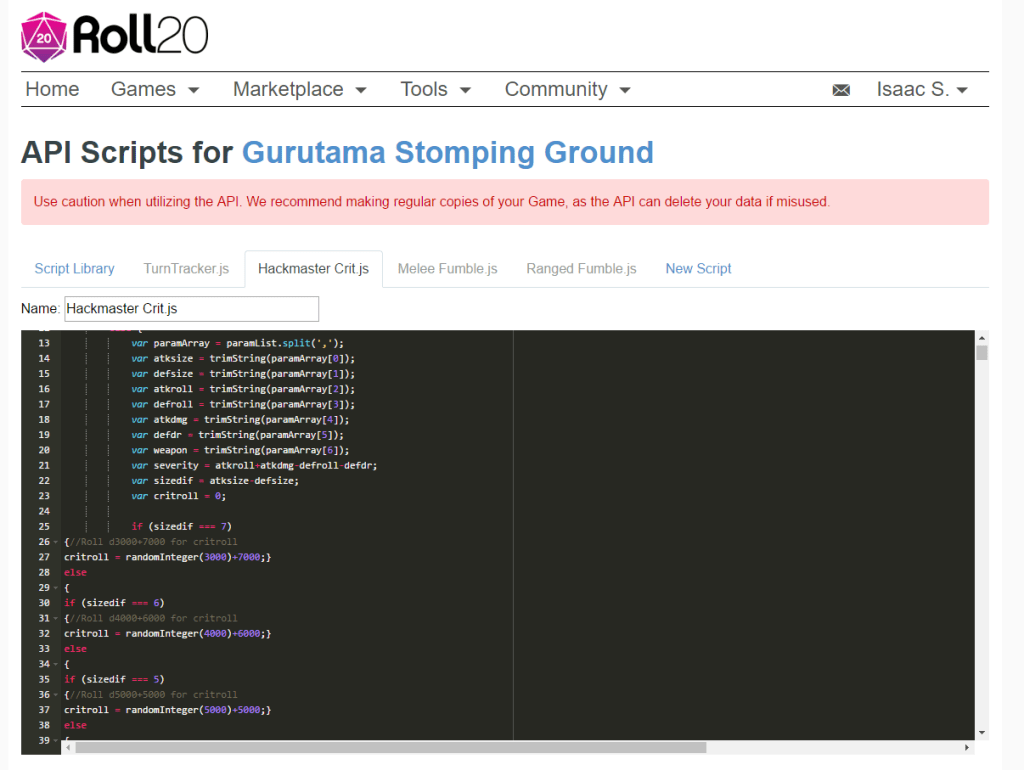
I looked around on Roll20’s forums and found the skeletons of some other scripts to use for the script to take information out of the Critical Hit macro and use it in the program.
From there, the script rolls a several thousand sided die that represents the location hit by the critical with different sized dice depending on the difference between the attacker’s and the defender’s sizes.
After getting that roll, the script enters a gigantic ~3,000 line long if/else tree that serves in place of the twenty page table. This comes up with a different results based on the location of the blow, how hard the target was hit, and what type of weapon was used.
Finally, the program spits out the result into Roll20’s chat along with some background information to make sure that it worked correctly.
Does the code work? Well, I don’t know yet. I’ve been typing away at it for about a week now and have transferred roughly one fifth of that giant table in the book to the programming script.
Due to how I structured the code, I can’t tell if it works correctly until I finish the whole thing.
Unfortunate, but what can I do at this point?
So here’s hoping that when I’m done in a few weeks and I press that Critical Hit macro button, it runs as smooth as melted chocolate.
If not, then I’ll probably have a blog post to make about code debugging…
-GoCorral
P.S. If you play Hackmaster and are interested in this code I will be posting the completed version of it on the Roll20 forums and the Hackmaster forums once I’ve finished. I’m also planning on doing a similar thing for the Fumble charts for Hackmaster so stay tuned for those as well.




 GoCorral
Leave a comment